

Learn how to check your T-Mobile order status, track shipments, fix delays, and contact support quickly. Step-by-step guidance with expert tips and real solutions.
Having the correct method to check your order status with T-Mobile can save you hours of confusion—especially when you’re waiting on a new phone, SIM, or accessory. Orders typically move fast, but occasional delays, verification steps, or shipping gaps can leave you unsure of what’s happening.
In most cases, tracking your order is straightforward. However, understanding why a status hasn’t changed—or what to do next—is where most users get stuck. This guide breaks everything down clearly so you can track, troubleshoot, and resolve issues without unnecessary frustration.
- ✨Quick Answer: How to Check T-Mobile Order Status
- Understanding T-Mobile Order Status Stages
- ➤ 1. Order Received
- ➤ 2. Processing
- ➤ 3. Shipped
- ➤ 4. Out for Delivery
- ➤ 5. Delivered
- All Ways to Track Your T-Mobile Order
- 👉 Method 1: Official T-Mobile Order Status Page
- 👉 Method 2: T-Mobile Account Dashboard
- 👉 Method 3: Email Confirmation Tracking
- 👉 Method 4: Carrier Tracking (UPS/FedEx)
- 👉 Method 5: Customer Support
- Common Order Status Issues (And What They Mean)
- ➡️ Order Stuck in Processing
- ➡️ No Tracking Number After Shipping
- ➡️ Delivered But Not Received
- ➡️ Order Cancelled Automatically
- Real-World Scenarios: When You Might Need Help
- ➜ Scenario 1: New Phone Upgrade Delay
- ➜ Scenario 2: SIM Card Not Arriving
- ➜ Scenario 3: Pre-Order Device
- ➜ Scenario 4: Business Account Orders
- Expert Insights: Hidden Details Most Users Miss
- ➤ 1. “Processing” Doesn’t Mean Something Is Wrong
- ➤ 2. Carrier Tracking Is Often Faster
- ➤ 3. Weekend Orders May Appear Delayed
- ➤ 4. Address Mismatch Can Freeze Orders
- ➤ 5. High-Demand Devices Cause Backlogs
- Strategic Breakdown: Best Way to Track Based on Situation
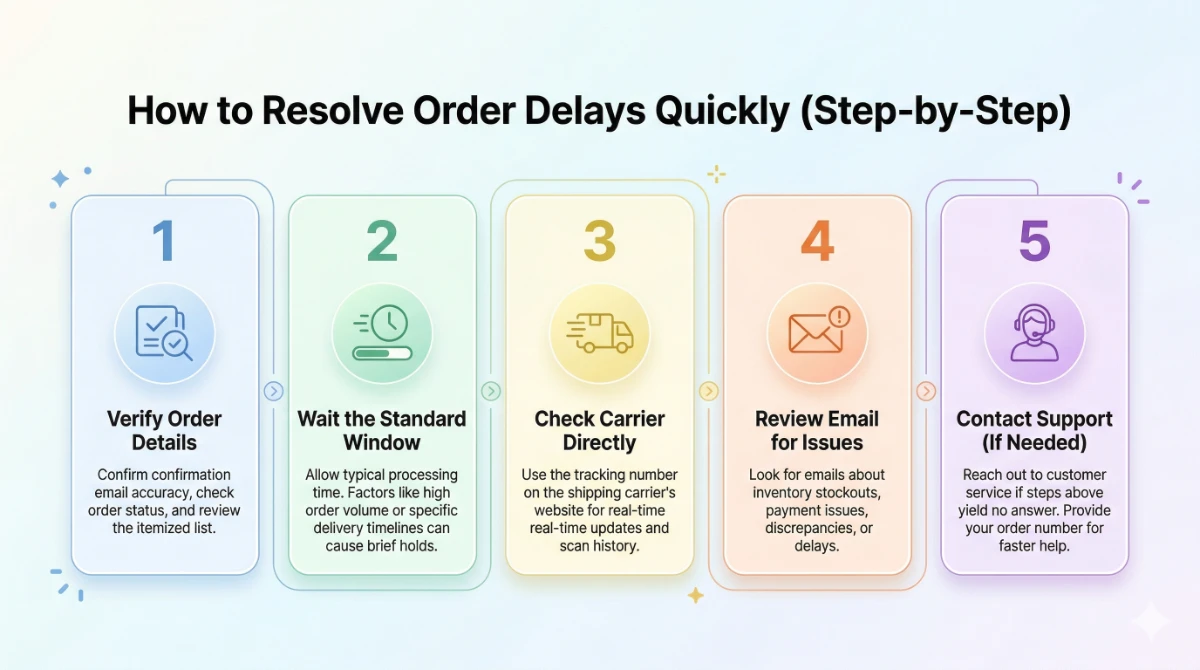
- Step-by-Step: How to Resolve Order Delays Quickly
- 1st Step:↳ Verify Order Details
- 2nd Step:↳ Wait the Standard Window
- 3rd Step:↳ Check Carrier Directly
- 4th Step:↳ Review Email for Issues
- 5th Step:↳ Contact Support (If Needed)
- Pro Tips to Avoid Order Issues
- When You Should Contact T-Mobile Immediately
- Conclusion
- Get Started
- Frequently Asked Questions (❓)
- 👇Related Articles:
✨Quick Answer: How to Check T-Mobile Order Status
To check your T-Mobile order status, visit the official order tracking page, log in to your account, or enter your order number and ZIP code. You can also track shipments via carrier links (UPS/FedEx) or contact support if the status hasn’t updated within 24–48 hours.
Understanding T-Mobile Order Status Stages
Before jumping into troubleshooting, it helps to understand what each status actually means. Many users misinterpret these updates, which leads to unnecessary concern.
➤ 1. Order Received
This appears immediately after checkout.
- Your order has been placed successfully
- Payment authorization is in progress
- No physical processing has started yet
Typical timeframe: Instant to a few hours
➤ 2. Processing
This is where most delays occur.
- Inventory is being allocated
- Identity verification may happen
- Payment is confirmed
This typically happens when:
- You ordered a high-demand device
- There’s a billing verification issue
- Your shipping address needs validation
Typical timeframe: 1–2 business days
➤ 3. Shipped
Once shipped, things become clearer.
- A tracking number is generated
- Carrier (UPS/FedEx) takes over
- Delivery ETA becomes visible
Tip: If you see “Shipped” but no tracking movement, it usually means the label is created but the package hasn’t been scanned yet.
➤ 4. Out for Delivery
- Package is on the final route
- Delivery expected same day
➤ 5. Delivered
- Package has been marked delivered
- Check your doorstep, mailbox, or reception
If missing, this typically means:
- Delivered to neighbor
- Left in a secure location
- Carrier scanned prematurely
All Ways to Track Your T-Mobile Order
There isn’t just one way to check your order. Depending on your situation, some methods are faster than others.
👉 Method 1: Official T-Mobile Order Status Page
This is the most direct method.
What you need:
- Order number
- Billing ZIP code
Best for: Quick checks without logging in
👉 Method 2: T-Mobile Account Dashboard
If you created an account:
- Log in
- Go to “Orders”
- View real-time updates
Best for: Managing multiple orders
👉 Method 3: Email Confirmation Tracking
After placing an order, you’ll receive emails with:
- Order confirmation
- Shipping updates
- Tracking links
Tip: Check spam/junk if you don’t see emails.
👉 Method 4: Carrier Tracking (UPS/FedEx)
Once shipped, use the carrier directly.
- Faster updates than T-Mobile sometimes
- Real-time delivery changes
👉 Method 5: Customer Support
If nothing updates:
- Call or chat support
- Provide order number
Use this when:
- Order stuck in “Processing”
- No shipping update after 48 hours
Common Order Status Issues (And What They Mean)
Even when everything seems correct, orders can behave unpredictably. Here’s how to interpret common problems.
➡️ Order Stuck in Processing
This typically happens when:
- Payment verification is pending
- Device is temporarily out of stock
- Fraud check is triggered
What to do:
- Wait 24–48 hours
- Check email for verification requests
- Contact support if no update
➡️ No Tracking Number After Shipping
In most cases:
- Label created but not scanned
- Carrier delay in pickup
Solution:
- Wait 12–24 hours
- Then check again
➡️ Delivered But Not Received
This is more common than expected.
Possible reasons:
- Delivered to wrong address
- Left with neighbor
- Package stolen
Steps:
- Check around your property
- Ask neighbors
- Contact carrier
- File a claim if needed
➡️ Order Cancelled Automatically
This usually indicates:
- Payment failed
- Verification not completed
- System flagged the order
Next step: Place the order again or contact support
Real-World Scenarios: When You Might Need Help
➜ Scenario 1: New Phone Upgrade Delay
You ordered a new device, but it’s stuck in processing.
Likely cause: High demand or stock delay
Action: Wait 48 hours → then escalate
➜ Scenario 2: SIM Card Not Arriving
SIM cards usually ship quickly.
If delayed:
- Address issue
- Carrier delay
Action: Track via carrier → request replacement if needed
➜ Scenario 3: Pre-Order Device
Pre-orders follow different timelines.
- Ships closer to release date
- Status may remain “Processing” longer
➜ Scenario 4: Business Account Orders
Business orders sometimes require:
- Additional approvals
- Account-level verification
Expert Insights: Hidden Details Most Users Miss
➤ 1. “Processing” Doesn’t Mean Something Is Wrong
In many cases, users panic too early. Processing is normal—even for up to 48 hours.
➤ 2. Carrier Tracking Is Often Faster
Once shipped, T-Mobile updates can lag behind UPS/FedEx.
➤ 3. Weekend Orders May Appear Delayed
Orders placed Friday evening may not move until Monday.
➤ 4. Address Mismatch Can Freeze Orders
If billing and shipping details don’t align, your order may pause silently.
➤ 5. High-Demand Devices Cause Backlogs
New iPhones or flagship devices often create shipping delays.
Strategic Breakdown: Best Way to Track Based on Situation
| Situation | Best Method | Why |
|---|---|---|
| Just placed order | T-Mobile page | Immediate confirmation |
| Waiting for shipment | Account dashboard | Detailed updates |
| Order shipped | Carrier tracking | Real-time data |
| No updates | Customer support | Direct resolution |
| Multiple orders | Account login | Centralized tracking |
Step-by-Step: How to Resolve Order Delays Quickly
1st Step:↳ Verify Order Details
- Confirm order number
- Check email confirmation
2nd Step:↳ Wait the Standard Window
- Processing: 24–48 hours
- Shipping updates: 12–24 hours
3rd Step:↳ Check Carrier Directly
- Use tracking number
- Look for scan updates
4th Step:↳ Review Email for Issues
Look for:
- Payment problems
- Verification requests
5th Step:↳ Contact Support (If Needed)
Only escalate if:
- No updates after 48 hours
- Order shows errors
- Delivery missing
Pro Tips to Avoid Order Issues
- Double-check shipping address before checkout
- Use a verified payment method
- Avoid placing orders during peak launches
- Track emails closely after purchase
- Create a T-Mobile account for easier tracking
When You Should Contact T-Mobile Immediately
You don’t always need to wait.
Contact support right away if:
- Payment was charged but no confirmation received
- Order disappears from your account
- Tracking shows delivered but package is missing for over 24 hours
- You receive a cancellation email unexpectedly
Conclusion
Tracking your T-Mobile order status is usually simple—but knowing how to interpret each stage makes all the difference. Most delays are temporary and resolve within standard processing windows. When they don’t, having the right troubleshooting steps ensures you can act quickly without unnecessary stress.
If the issue persists beyond expected timelines, reaching out to support with the right details will speed up resolution significantly.
Get Started
- Use order number + ZIP code to track quickly
- “Processing” delays are normal for 24–48 hours
- Carrier tracking provides faster updates after shipping
- Most delivery issues can be resolved by checking locally first
- Contact support only after standard waiting periods
Frequently Asked Questions (❓)
In most cases, processing takes 24–48 hours. However, high-demand devices or verification checks can extend this timeframe slightly.
This typically happens due to payment verification, stock availability, or address validation issues. If it lasts more than 48 hours, contacting support is recommended.
Yes, you can track it using your order number and billing ZIP code on the official tracking page.
Start by checking around your property and with neighbors. If still missing, contact the carrier and file a claim if necessary.
Shipping may occur, but processing and updates are often limited over weekends, which can make orders appear delayed.
In most cases, no. You’ll need to contact support immediately—before the order ships—to request any changes.
👇Related Articles:
Related Posts

DHgate Tracking: Track Your DHgate Courier Shipment Online
Wondering where your DHgate package is? Learn how to track orders, understand…